Summary
This message is for Kion (cloudtamer) users.
Kion (cloudtamer) is migrating its Identity Management System (IDMS) from Active Directory (AD) to Okta. User logins will redirect to Okta when accessing cloudtamer.cms.gov starting on Monday, March 9, 2026. User group ingestion will also transfer to Okta. Users should migrate to Okta when it becomes available.
Impact
There should be no impact to your Kion (cloudtamer) experience. Your existing Cloud Access Roles (Identity Access Management (IAM) roles), Projects, Kion (cloudtamer) permissions, and more will migrate to your Okta user profile.
The migration will happen in phases:
- Phase 1 will introduce the new Okta login while maintaining AD in the background. This will allow continued usage of
ctkey and provide a method for rollback if necessary.
- Phase 2 will remove AD, resulting in a loss of support for
ctkey.
Future changes will require full migration from ctkey to kion-cli.
Action Required
When the Okta login is available, users should perform the following actions:
- Update any Kion (cloudtamer) Application Programming Interface (API) usage to use a Kion (cloudtamer) App API key generated with your Okta login.
- Update any
ctkey or kion-cli calls referencing a Kion (cloudtamer) API key to a new Kion (cloudtamer) API key generated with your Okta login.
- Set up auto-rotation for API keys generated with an AD service user.
Follow the steps under Okta Login below to complete the migration.
Okta Login
- Upon your next login to Kion (cloudtamer), you will no longer see the previous username and password fields.
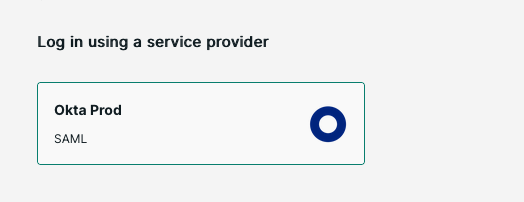
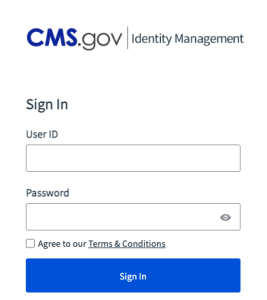
- Select Okta Prod login to access the Identity Management login screen (see screenshot below).
 3. After authenticating, Identity Management will redirect users back to cloudtamer.cms.gov (see screenshot below).

 Users already authenticated through Identity Management will not need to re-authenticate when the Okta login field is selected.
Future changes will require full migration from ctkey to kion-cli.We highly recommend that you migrate as soon as the new login is available. Please see the following pages for details:
Support
For questions or concerns, please contact your assigned Hosting Coordinator or submit a Hybrid Cloud support ticket (enter Cloudtamer in the service field). You can also contact the Kion (cloudtamer) team on Slack @kion-cloudtamer-team or #kion-cloudtamer-support.
|

