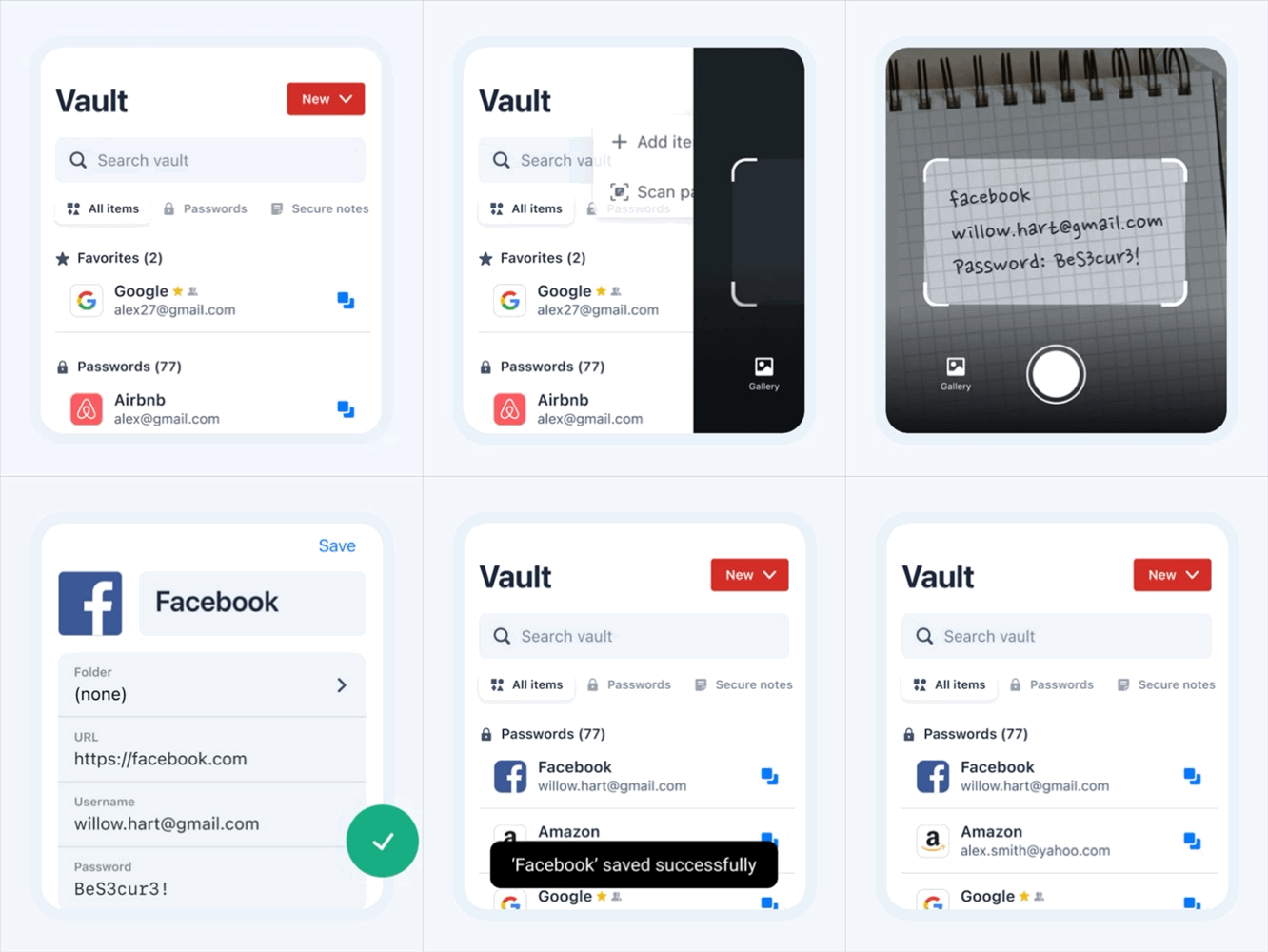
Meet Mobile Smart Scanner—the fastest way to save your passwords
If your passwords live in a notebook, on sticky notes, or buried in a notes app, you've always had to retype them—one by one. Now, you don't have to.
With the new LastPass Mobile Smart Scanner, adding passwords is fast and easy. Just open the app and point your camera at a written or typed password. Smart Scanner automatically detects the site, username, and password—so you can review, save, and move on.
Here's what Smart Scanner does:
Scans typed or handwritten passwords from any note, journal, or piece of paper
Automatically identifies the site, username, and password
Creates a ready-to-save and autofill vault entry in seconds
Stays completely on your device—your images are never stored or sent to LastPass
This is a first-of-its-kind way to add passwords—and it’s available only in LastPass.
Smart Scanner lives in the LastPass mobile app. On the free plan, LastPass is limited to
one device type—if mobile isn't your primary device, you'll need to upgrade to Premium or Families to gain access to the Smart Scanner.